Discover
Inventory projects, workbooks, data sources, extracts, flows, schedules, subscriptions, users, groups and business-critical dashboards.
Get your migration assessed, planned, executed and validated with DataDive. We help Australian teams move to Tableau Cloud with minimal risk and maximum business confidence.
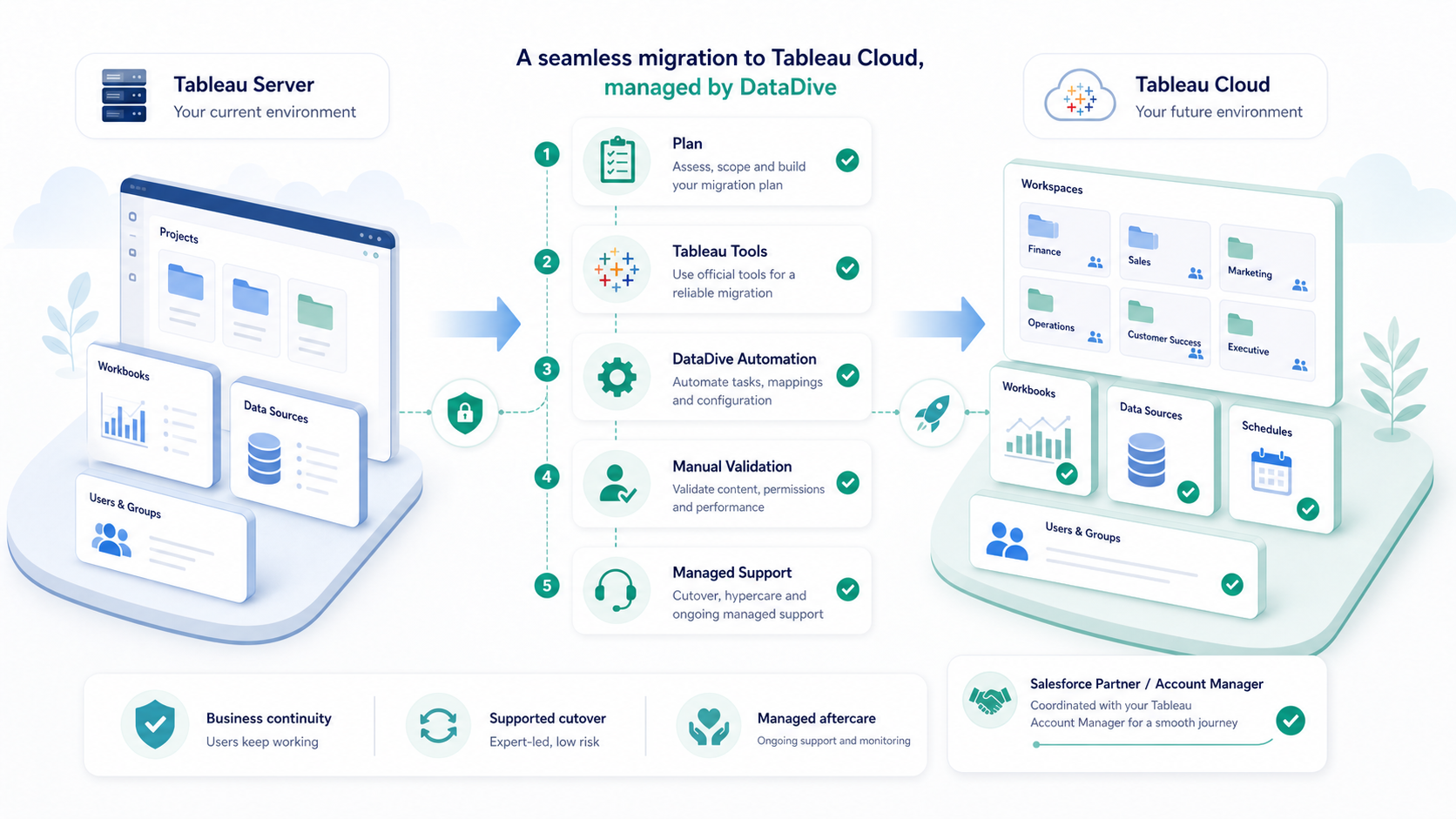
Inventory projects, workbooks, data sources, extracts, flows, schedules, subscriptions, users, groups and business-critical dashboards.
Confirm Cloud site structure, identity provider approach, Tableau Bridge needs, permissions model and migration wave plan.
Clean stale content, map owners, document exceptions, prepare data connectivity and decide where official tooling or manual migration fits.
Move content in controlled waves, track gaps, rebuild items that need Cloud-specific configuration, and coordinate business sign-off.
Check data, access, refreshes, subscriptions, schedules and performance, then support users through cutover and hypercare.
Choose the path that fits your team. DataDive can run the assessment with you, or your Tableau administrator can run Tableau's workbook and send us the exported results for review.
Best for multi-site estates, complex permissions, many user groups, embedded dashboards, or business-critical reporting where the readiness workbook is only one input into the migration plan.
Best for a smaller, clean single-site Tableau Server environment where your administrator can run the initial technical assessment internally and share only the exported output with DataDive.
Do not send passwords or Tableau repository credentials. If the export contains sensitive data, contact us first and we will agree a secure review path.
Tableau recommends understanding the platform differences, testing Cloud, tuning Server content, then choosing the right migration path. DataDive turns that into a practical customer flow.
Contact Migration ExpertConfirm what changes for admins, users, authentication, schedules, data access and governance before the project scope is locked.
Give administrators and dashboard owners a small Cloud site to test sign-in, publishing, permissions, refreshes and new Tableau features.
Review slow or business-critical workbooks before migration so Cloud validation starts from dashboards that already perform reliably.
Select the approach that fits your estate: manual migration for small environments, Tableau tooling for repeatable moves, or a partner-led migration when governance, data access and validation need stronger delivery control.
DataDive runs Tableau Cloud migrations as a managed delivery process, not a blind export and import. We combine Tableau-supported migration patterns, repeatable automation and hands-on review so every priority asset has an owner, a migration path and a validation outcome.
Projects, owners, permissions and dependencies are grouped into controlled migration waves with clear go/no-go checkpoints.
Scripts support inventory, mapping, publishing, permission checks and exception tracking so consultants focus on the decisions that need judgement.
Workbooks are checked for data accuracy, refresh behaviour, user access, performance and owner acceptance before users are moved.
Best for a smaller, clean single-site migration.
Best for teams that need a managed migration, not a basic tool run.
Best for higher-risk estates with more users, groups and dependencies.
DataDive can continue with Tableau managed services for user requests, refresh failures, dashboard questions, governance, performance tuning and platform administration.
These answers are written for the people responsible for Tableau Server, Cloud readiness, reporting continuity and business sign-off.
A managed migration usually includes estate discovery, content cleanup, Cloud site design, authentication planning, Tableau Bridge and data connectivity checks, user and group mapping, workbook and data source migration, refresh schedule rebuilds, validation, cutover support, and post-migration hypercare.
You may need Tableau Bridge when Tableau Cloud must refresh or query data that remains behind your private network. We review your data sources, refresh patterns, credentials, and network constraints before recommending a Bridge design.
Some items often need review or rebuild work, including refresh schedules, subscriptions, saved credentials, embedded dashboard links, URL actions, custom admin views, some extensions, user settings, and permissions that should be redesigned instead of copied exactly.
Yes. We map users, groups, projects, site roles, and permissions, then validate business-critical access in Tableau Cloud. Where the current Server model is messy, we recommend cleanup before migration.
A smaller, clean single-site migration can often be planned and completed in weeks. Larger estates with complex permissions, many data sources, embedded dashboards, or multiple business units usually need a phased migration plan.
Yes. We use Tableau-supported migration paths and tooling where they fit the estate. We add DataDive automation and manual validation for mapping, tracking, configuration checks, edge cases, and business readiness.
We validate priority dashboards, data source connections, extracts, refresh schedules, subscriptions, permissions, user access, dashboard performance, and business sign-off items before and after cutover.
Yes. DataDive provides post-migration hypercare and ongoing Tableau managed services for access requests, refresh issues, dashboard questions, performance tuning, governance, and platform administration.